
(Interview-Ready ETL Scenario with Step-by-Step Logic)
Introduction
Separating unique records and duplicate records into different target tables is one of the most frequently asked Informatica ETL interview questions for experienced professionals.
The real challenge is not just identifying duplicates—but ensuring that:
- All original records are preserved
- No data loss occurs
- Duplicate records remain repeated
- Unique records are loaded only once
In this article, we will solve this problem using Informatica PowerCenter / IDMC transformations, and also briefly touch on the SQL logic behind it.
Source Data Scenario
Assume the source table contains a single column COL1 with the following data:
1
2
3
4
5
4
5
6
7
Observations:
4and5are duplicate values1,2,3,6,7are unique values
Business Requirement
We need to load the data into two separate target tables:
Target 1 – Unique Records
Each value should appear only once.
1
2
3
4
5
6
7
Target 2 – Duplicate Records
Only duplicate values, repeated as many times as they appear in the source.
4
4
5
5
✔ Total records loaded = 7 + 4 = 11
✔ Matches source record count → No data loss
High-Level Informatica Mapping Design
Source
  ↓
Sorter
  ↓
Expression
  ↓
Aggregator (COUNT)
   ├──→ Router → Target 1 (Unique)
   └──→ Joiner → Router → Target 2 (Duplicates Repeated)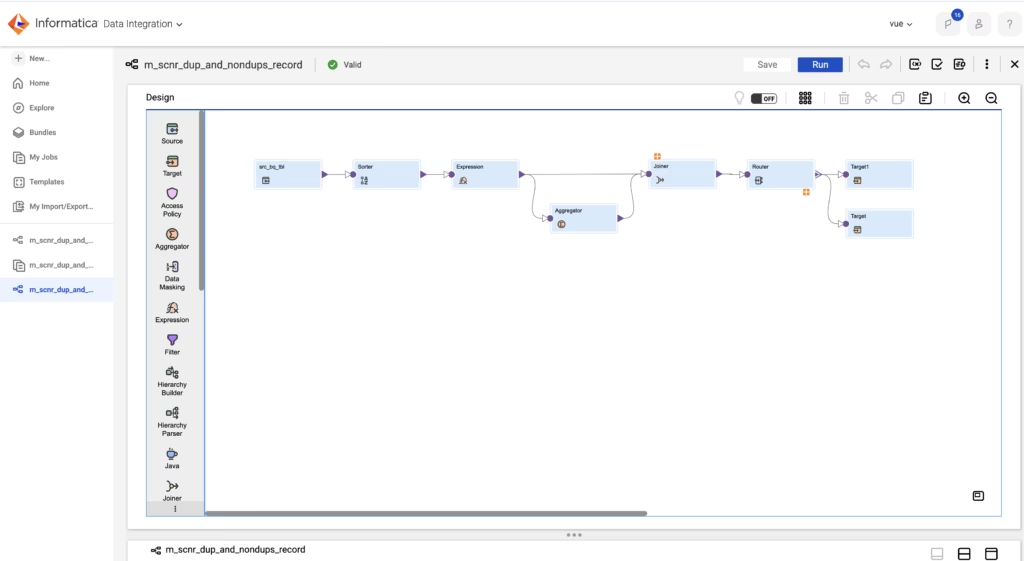
Step-by-Step Informatica ETL Solution
Step 1: Source Qualifier
- Import the source table containing
COL1 - No SQL override required
Step 2: Sorter Transformation
- Sort data by
COL1(Ascending)
Why?
- Groups identical values together
- Improves Aggregator performance
- Ensures predictable data flow
Step 3: Expression Transformation
Create an Expression transformation with:
- Input:
COL1 - Output port:
DUMMY = 1
Purpose of DUMMY column:
- Used only to support Joiner logic
- Helps preserve original row flow
- Common ETL design pattern
Step 4: Aggregator Transformation
This is the core logic.
Configuration:
- Group By:
COL1 - Output Port:
CNT = COUNT(COL1)
Aggregator Output:
| COL1 | CNT |
|---|---|
| 1 | 1 |
| 2 | 1 |
| 3 | 1 |
| 4 | 2 |
| 5 | 2 |
| 6 | 1 |
| 7 | 1 |
✔ Now we know which values are unique and which are duplicates.
Path 1: Load Unique Records (Target 1)
Router Transformation
Create a group:
UNIQUE
Condition: CNT = 1
Connect this group to Target 1.
Result:
1
2
3
6
7
👉 Note: At this stage, only strictly unique values are loaded.
If your requirement is distinct values including duplicates once, use CNT >= 1.
Path 2: Load Duplicate Records (Repeated) – Key Step
⚠ Important Concept:
The Aggregator has already collapsed duplicates.
To get repeated duplicate rows, we must join back to the original source.
Joiner Transformation
Join Configuration:
- Master: Expression output (original rows)
- Detail: Aggregator output
- Join Type: INNER JOIN
- Join Condition:
Expression.COL1 = Aggregator.COL1
Joiner Output Example:
| COL1 | CNT |
|---|---|
| 4 | 2 |
| 4 | 2 |
| 5 | 2 |
| 5 | 2 |
| 1 | 1 |
| 2 | 1 |
| 3 | 1 |
| 6 | 1 |
| 7 | 1 |
✔ Duplicate values now appear multiple times again
Router Transformation (Duplicate Filter)
Create a group:
DUPLICATE
Condition: CNT > 1
Connect this group to Target 2.
Final Output
Target 1 – Unique Records
1
2
3
6
7
Target 2 – Duplicate Records (Repeated)
4
4
5
5
✔ All source records accounted for
✔ No data loss
✔ Business requirement satisfied
SQL Equivalent Logic (For Understanding)
Unique Records:
SELECT COL1
FROM SRC
GROUP BY COL1
HAVING COUNT(*) = 1;
This approach using Sorter → Expression → Aggregator → Joiner → Router is a proven, production-grade Informatica design for handling duplicates.
Also Read: Interview Question: Explain Snowflake Architecture




Pingback: Dynamic Mapping Task in Informatica Cloud (IICS): A Practical Guide - Tank Seekers