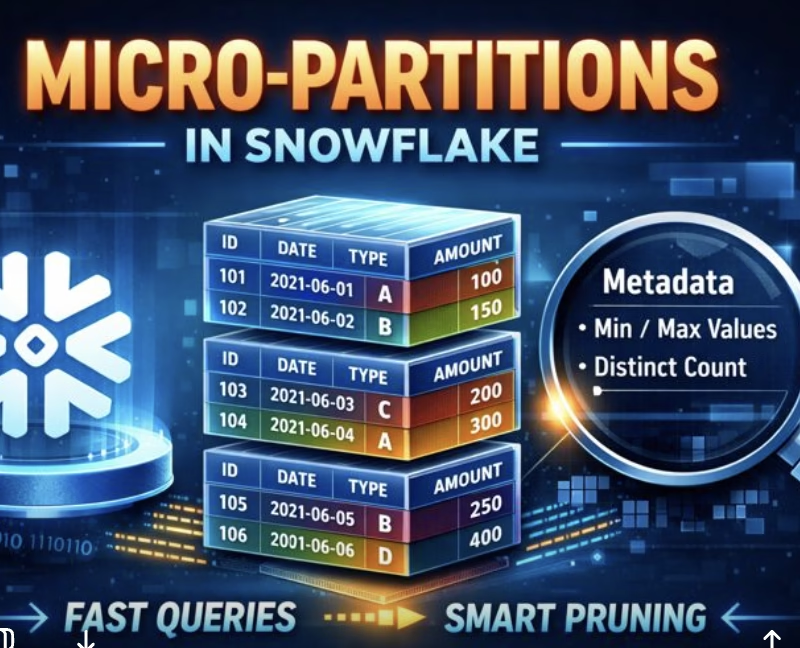
Learn how Snowflake micro-partitions, metadata, and clustering work together to deliver fast queries through intelligent pruning—explained for data engineers.
Traditional data warehouses depend heavily on static partitioning to improve performance. While this approach works, it comes with challenges manual maintenance, data skew, uneven partition sizes, and complex DDL management.
To solve these problems, Snowflake introduced a modern, cloud-native approach called micro-partitioning. This design removes the operational burden of managing partitions while delivering faster queries and better scalability.
For interviews, understanding why Snowflake moved away from static partitioning is just as important as knowing how micro-partitions work.
What Are Micro-Partitions?
In Snowflake, every table is automatically divided into micro-partitions. A micro-partition is the smallest unit of storage that Snowflake manages internally.
Key characteristics:
Each micro-partition stores 50 MB to 500 MB of data before compression
Data is always stored in compressed form
Micro-partitions are created automatically during data load
Users do not define or manage them manually
Each micro-partition contains a group of rows, stored in a columnar format, which is crucial for analytical performance.
Interview one-liner:
In Snowflake, micro-partitions are automatically created, immutable, and stored in a columnar format.
How Data Is Stored Inside Micro-Partitions
When data is inserted:
Snowflake organizes rows into micro-partitions based on load order
Each column is stored independently
Columns are compressed using the most efficient algorithm chosen automatically
Because of columnar storage:
Queries scan only required columns
Unused columns are ignored
I/O cost is significantly reduced
This design makes Snowflake highly efficient for analytical and reporting workloads.
Metadata: The Real Power Behind Performance
Every micro-partition has rich metadata associated with it. This metadata is lightweight but extremely powerful.
Snowflake stores metadata such as:
Minimum and maximum values for each column
Number of distinct values per column
Null count and distribution details
Additional statistics used for optimization
This metadata allows Snowflake to make smart decisions before touching actual data.
Query Pruning: How Snowflake Avoids Full Table Scans
When a query runs, Snowflake:
Reads metadata for all micro-partitions
Identifies which partitions cannot satisfy the filter conditions
Scans only relevant micro-partitions
This process is called query pruning.
Simple Example
SELECT type, country
FROM orders
WHERE order_date = '2024-01-01';
If only a small subset of micro-partitions contain that date:
Snowflake scans only those partitions
Only the type and country columns are read
Everything else is skipped
Interview tip:
Query pruning happens before query execution using metadata, not data scans.
Why Micro-Partitioning Is Better Than Static Partitioning
Traditional Partitioning
Snowflake Micro-Partitioning
Manually defined
Fully automatic
Large partitions
Small (50–500 MB)
High maintenance
No maintenance
Risk of data skew
Uniform distribution
Limited pruning
Fine-grained pruning
This is why Snowflake scales easily even with billions of rows.
Impact of Micro-Partitions on DML Operations
All DML operations take advantage of metadata:
DELETE / UPDATE / MERGE scan only relevant micro-partitions
Deleting all rows can be a metadata-only operation
No physical rewrite is required unless needed
Dropping a Column
When a column is dropped:
Existing micro-partitions are not rewritten
Data remains in storage but becomes inaccessible
Physical cleanup happens automatically later
Interview insight:
Snowflake prioritizes logical metadata changes over physical rewrites.
What Is Data Clustering in Snowflake?
Over time, as data is continuously loaded, micro-partitions may become less organized. Related data can spread across many partitions, reducing pruning efficiency.
Clustering helps by:
Organizing data around commonly filtered columns
Improving micro-partition locality
Reducing the number of partitions scanned
Snowflake automatically captures clustering metadata during data loads.
How Clustering Improves Query Performance
Consider a table frequently queried by date:
If data is naturally ordered by date → better pruning
If data is scattered → more partitions scanned
Snowflake:
Prunes unnecessary micro-partitions
Then prunes unnecessary columns within those partitions
This two-level pruning is extremely powerful for time-series data.
Interview-friendly example:
A query for one hour of data in a year may scan only 1/8760th of the table.
Clustering Depth: Measuring Data Organization
Snowflake tracks clustering depth, which measures:
How much micro-partitions overlap for a given column
The lower the depth, the better the clustering
Uses of clustering depth:
Monitoring table health over time
Deciding whether clustering keys are required
Identifying performance degradation
Important note:
Clustering depth is a guideline, not an absolute metric
Query performance is the ultimate indicator
Snowflake stores data in small, automatically managed micro-partitions with rich metadata. During query execution, Snowflake uses this metadata to prune irrelevant partitions and scan only required columns. Over time, clustering helps maintain efficient data organization, ensuring consistent performance at scale.
Why did Snowflake move from static partitioning to micro-partitioning?
Snowflake transitioned from static partitioning to micro-partitioning to eliminate the operational burden of managing partitions, address issues such as data skew and uneven partition sizes, and enable faster queries with better scalability.
What are micro-partitions in Snowflake?
Micro-partitions in Snowflake are the smallest units of storage, automatically created for each table, typically storing between 50 MB to 500 MB of data, and are managed internally without user intervention.
How is data stored inside micro-partitions in Snowflake?
Inside micro-partitions, data is organized based on load order, stored in columns independently, and compressed with the most efficient algorithm, enabling optimized scanning of only necessary columns during queries.
What role does metadata play in Snowflake’s performance?
Metadata such as min/max values, number of distinct values, and null counts allows Snowflake to make intelligent decisions to optimize query execution, including skipping irrelevant micro-partitions through query pruning.
How does Snowflake’s query pruning improve performance?
Snowflake reads metadata to identify micro-partitions that do not satisfy query filters, thereby scanning only relevant partitions and significantly reducing I/O costs and improving query performance.