
If you are preparing for a data engineering interview, there is one question you will almost surely face: “What is SCD Type 2, and how will you implement it?” At first, it sounds scary. However, the idea is very simple. So, let’s break it down in simple words, with small SQL and PySpark examples that you can actually run.
⚡ SCD Type 2: Quick Answer
SCD Type 2 keeps full history in a dimension table. When a value changes, you close the old row and insert a new row as the current version. In short, you need a surrogate key, effective dates and a current flag, plus a simple two-step load: first close, then insert.
What is a Slowly Changing Dimension (SCD)?
In a data warehouse, we usually have two kinds of tables. First, fact tables store events and numbers, like orders, payments or clicks. Second, dimension tables store descriptive details, like customer name, city or product category.
Dimension data does not change every second, but it does change sometimes. For example, a customer moves from Pune to Bengaluru. Similarly, a product moves from “Electronics” to “Accessories”. Because these changes happen slowly and rarely, we call them Slowly Changing Dimensions.
So, the big question is: when the city changes, what should we do with the old value? There are different “types” of answers:
- Type 0: Never change the value. Keep the original forever.
- Type 1: Overwrite the old value. As a result, no history is kept.
- Type 2: Add a new row for the new value and keep the old row as history.
- Type 3: Keep a “previous value” column next to the current value (limited history).
Type 2 is the most popular in interviews and in real projects, because the business usually wants to know what was true at that time.
Priya moves from Pune to Bengaluru. What does each SCD type store?
Switch between the types and compare the dimension table.
SCD Type 2 Explained with a Simple Example
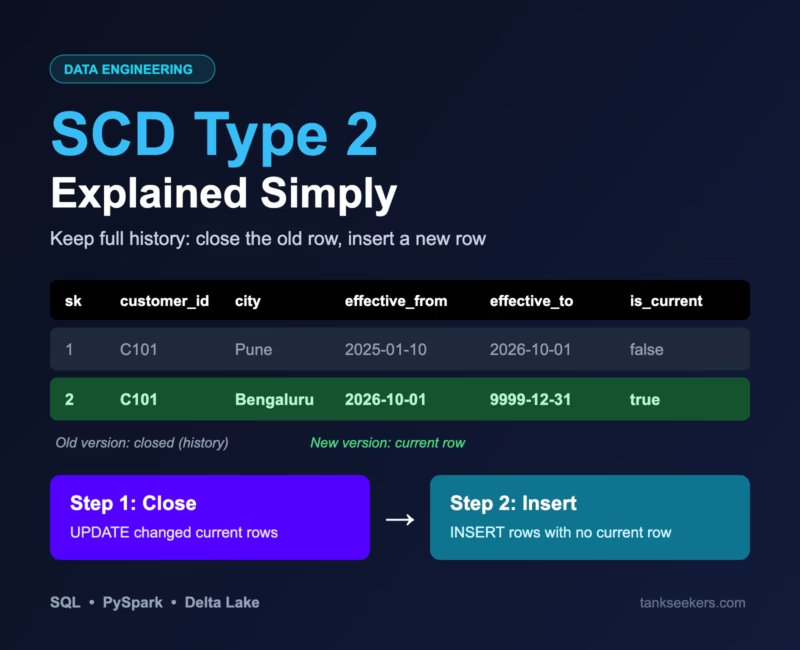
Imagine customer C101, Priya, lived in Pune. Then, on 1 October, she moved to Bengaluru. Her September orders should still count under Pune in sales reports. Meanwhile, her new orders should go under Bengaluru.
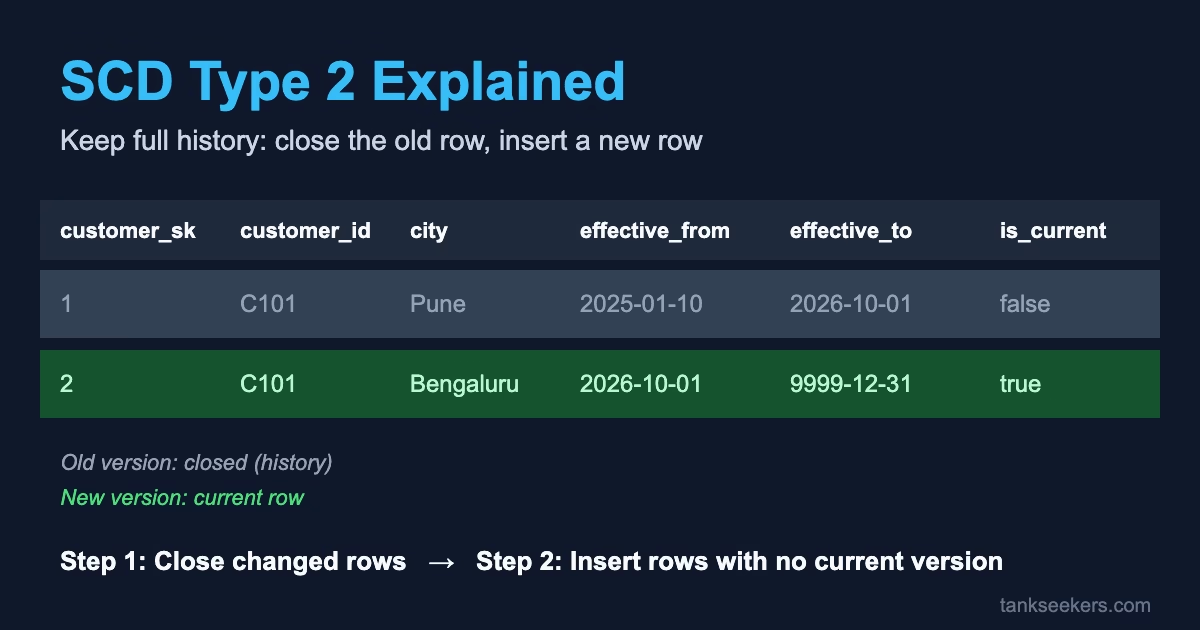
With Type 1, we would overwrite Pune with Bengaluru. As a result, September sales would wrongly move to Bengaluru. With SCD Type 2, however, the table looks like this:
| customer_sk | customer_id | name | city | effective_from | effective_to | is_current |
|---|---|---|---|---|---|---|
| 1 | C101 | Priya | Pune | 2025-01-10 | 2026-10-01 | false |
| 2 | C101 | Priya | Bengaluru | 2026-10-01 | 9999-12-31 | true |
We do not delete the old row. Instead, we only “close” it. After that, the new row becomes the current one.
SCD Type 2 playground
Move Priya to a new city and watch the two steps run. Then switch to Type 1 to see how history disappears.
The 4 Extra Columns You Need for SCD Type 2
The Kimball Group, which made dimensional modeling popular, describes Type 2 as adding a new row along with a few helper columns. In simple words:
- Surrogate key (customer_sk): A new unique ID for every version of the row. Since the business key (customer_id) repeats, it cannot be the primary key anymore. Also, fact tables store the surrogate key, so each order points to the correct version.
- effective_from: The date from which this version is valid.
- effective_to: The date until which it was valid. For the current row, we use a far-future date like 9999-12-31 (some teams use NULL instead).
- is_current: A simple true/false flag, so that you can quickly pick the latest row.
Tap a column to see what it does
These are the 4 helper columns that turn a normal dimension table into a history table.
How to Implement SCD Type 2 in SQL
The easiest way to understand the logic is a two-step approach. For example, assume new data arrives daily in a staging table called stg_customer. Here is a PostgreSQL-style example.
How every SCD Type 2 load works
Press play to walk through one daily load.
Staging
New data lands in stg_customer. Deduplicate it so each customer appears once.
Step 1: Close
UPDATE current rows whose values changed: set effective_to and is_current = false.
Step 2: Insert
INSERT every staging row that has no current row: changed and brand-new customers.
Table Design
CREATE TABLE dim_customer (
    customer_sk    BIGINT GENERATED ALWAYS AS IDENTITY PRIMARY KEY,
    customer_id    VARCHAR(20) NOT NULL,
    name           VARCHAR(100),
    city           VARCHAR(50),
    effective_from DATE NOT NULL,
    effective_to   DATE NOT NULL DEFAULT DATE '9999-12-31',
    is_current     BOOLEAN NOT NULL DEFAULT TRUE
);
Step 1 – Close the Old Rows That Changed
BEGIN;

UPDATE dim_customer d
SET    effective_to = CURRENT_DATE,
       is_current   = FALSE
FROM   stg_customer s
WHERE  d.customer_id = s.customer_id
  AND  d.is_current = TRUE
  AND  (d.name IS DISTINCT FROM s.name
        OR d.city IS DISTINCT FROM s.city);
Step 2 – Insert New Versions and Brand-New Customers
INSERT INTO dim_customer (customer_id, name, city, effective_from)
SELECT s.customer_id, s.name, s.city, CURRENT_DATE
FROM   stg_customer s
LEFT JOIN dim_customer d
       ON d.customer_id = s.customer_id
      AND d.is_current = TRUE
WHERE  d.customer_id IS NULL;

COMMIT;
🧠 Why does Step 2 work so neatly? After Step 1, a changed customer has no current row. Likewise, a brand-new customer has no current row. On the other hand, an unchanged customer still has one. Therefore, "insert everyone who has no current row" covers both cases in one query. In addition, running both steps inside one transaction (BEGIN ... COMMIT) makes sure readers never see a half-done update.
💡 Interview trap: Notice IS DISTINCT FROM. A normal <> returns NULL (not true) when one side is NULL. So, your query would miss a change from NULL to "Delhi". This is a classic interview trap.
How to Implement SCD Type 2 in PySpark (Delta Lake)
In big data projects on Databricks or Spark with Delta Lake, we follow the same two steps. First, clean the staging data so each customer appears only once. This matters because a Delta MERGE can fail if several source rows match the same target row. Here we use row_number(), which is a window function. If it is new to you, read our guide on SQL window functions first.
from pyspark.sql import functions as F
from pyspark.sql.window import Window
from delta.tables import DeltaTable

# Keep only the latest record per customer from staging
w = Window.partitionBy("customer_id").orderBy(F.col("updated_at").desc())
stg = (spark.table("stg_customer")
       .withColumn("rn", F.row_number().over(w))
       .filter("rn = 1")
       .select("customer_id", "name", "city"))
Step 1 – Close Changed Rows Using MERGE
dim = DeltaTable.forName(spark, "dim_customer")

(dim.alias("d")
    .merge(stg.alias("s"),
           "d.customer_id = s.customer_id AND d.is_current = true")
    .whenMatchedUpdate(
        condition="NOT (d.name <=> s.name) OR NOT (d.city <=> s.city)",
        set={"is_current": "false",
             "effective_to": "current_date()"})
    .execute())
In Spark SQL, <=> is the null-safe equal operator. So, NOT (a <=> b) means "the values are really different, even if one is NULL".
Step 2 – Append New Versions with a Left Anti Join
current_rows = spark.table("dim_customer").filter("is_current = true")

new_rows = (stg.join(current_rows.select("customer_id"),
                     on="customer_id", how="left_anti")
               .withColumn("effective_from", F.current_date())
               .withColumn("effective_to", F.lit("9999-12-31").cast("date"))
               .withColumn("is_current", F.lit(True)))

new_rows.write.format("delta").mode("append").saveAsTable("dim_customer")
A left anti join returns rows from the left side that have no match on the right side. In other words, it gives exactly "customers with no current row". For the surrogate key, you can define an identity column in the Delta table. Alternatively, you can generate keys with a hash of customer_id and effective_from.
📝 Note: Unlike the SQL version, these two Spark steps are two separate commits. So, if Step 2 fails, simply re-run the job, because Step 2 only inserts what is still missing. Also, Databricks Lakeflow pipelines offer built-in SCD Type 2 support through AUTO CDC, so check that option if your team uses it.
Common SCD Type 2 Mistakes to Avoid
- Duplicates in staging: Two rows for the same customer in one batch can create two "current" rows or make the merge fail. Therefore, always deduplicate first.
- Ignoring NULLs: Instead of plain comparisons, use
IS DISTINCT FROM(SQL) or<=>(Spark). - Tracking every column: First, decide which columns need history. For example, a typo fix in a name may be fine as Type 1, while city needs Type 2.
- Joining facts on the business key: Facts should store the surrogate key, or join on date range. Otherwise, you double-count.
- Late-arriving data: Using
current_date()is simple. However, in real systems, use the source change timestamp if available.
Are you ready for the SCD Type 2 question?
Answer 5 quick questions. You get instant feedback.
Key Takeaways
- SCD Type 2 keeps full history by adding a new row for every change.
- You need a surrogate key, effective dates and a current flag.
- The simplest logic has two steps: first close changed rows, then insert rows that have no current version.
- Also, deduplicate staging data and use null-safe comparisons.
- Finally, practice writing this logic by hand, because interviewers love it.
Frequently Asked Questions (FAQ)
1. What is the difference between SCD Type 1 and SCD Type 2?
Type 1 overwrites the old value and keeps no history. In contrast, Type 2 adds a new row and keeps the old one as history.
2. Why do we need a surrogate key in SCD Type 2?
Because the same business key (like customer_id) appears in many rows. So, the surrogate key uniquely identifies each version, and fact tables link to it.
3. Should effective_to be NULL or 9999-12-31 for the current row?
Both are used. A far-future date makes "between" date queries simpler. On the other hand, NULL is clearer but needs extra handling in queries.
4. How do I find a customer's city on a past date?
Simply filter with WHERE customer_id = 'C101' AND '2026-09-15' >= effective_from AND '2026-09-15' < effective_to.
5. Can I do SCD Type 2 with a single MERGE statement?
Yes. A common trick is to union the staging data with a copy of changed rows using a NULL merge key. That way, one MERGE both closes and inserts. Still, the two-step method shown here is easier to read and explain in interviews.