

If you are preparing for a data engineering or data analyst interview, there is one SQL topic you simply cannot skip: SQL window functions. Questions like “find the second highest salary in each department” or “remove duplicate rows but keep the latest one” show up again and again, and almost all of them are solved with a window function.
In this guide, let’s break down SQL window functions in simple words, with small examples you can run yourself, the most common interview questions, and the PySpark version of the same logic.
⚡ SQL Window Functions: Quick Answer
SQL window functions calculate values across a set of related rows (a “window”) without collapsing them like GROUP BY does. In short, use ROW_NUMBER() for unique numbering, RANK() and DENSE_RANK() for ranking with ties, and LAG() / LEAD() to compare a row with the previous or next one.
What Are SQL Window Functions?
For example, a normal aggregate like SUM() or COUNT() with GROUP BY squeezes many rows into one row. A window function does a calculation across a group of related rows, but keeps every row in the result.
In other words, think of it like this: each row looks through a “window” at its neighbors, does some math, and writes the answer next to itself.
In fact, all SQL window functions share the same basic shape:
function_name() OVER (
    PARTITION BY column   -- split rows into groups (optional)
    ORDER BY column       -- order rows inside each group (optional)
    frame_clause          -- which rows to include (optional)
)- PARTITION BY works like GROUP BY, but rows are not collapsed.
- ORDER BY decides the order inside each partition. Ranking, LAG and LEAD need it.
- Frame clause (for example
ROWS BETWEEN UNBOUNDED PRECEDING AND CURRENT ROW) controls which rows the function uses for running totals and moving averages.
Our Sample Table for SQL Window Functions
Next, we will use this small employees table in all examples:
| emp_id | name | dept | salary |
|---|---|---|---|
| 1 | Asha | IT | 90000 |
| 2 | Ravi | IT | 85000 |
| 3 | Meera | IT | 85000 |
| 4 | Neha | IT | 80000 |
| 5 | Priya | HR | 70000 |
| 6 | John | HR | 60000 |
| 7 | Karan | Sales | 50000 |
ROW_NUMBER vs RANK vs DENSE_RANK in SQL Window Functions
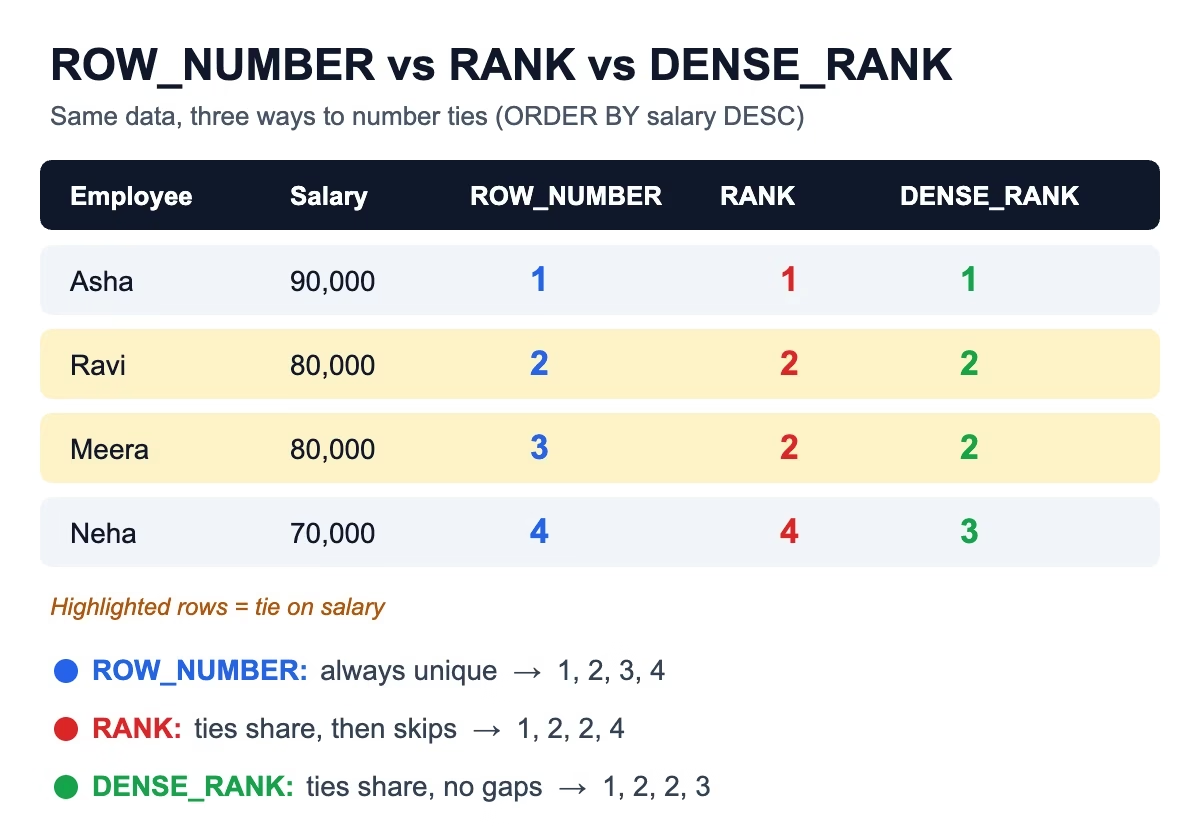
This is the most asked question about SQL window functions. All three give a position number, but they behave differently when there is a tie.
SELECT name, dept, salary,
       ROW_NUMBER() OVER (PARTITION BY dept ORDER BY salary DESC) AS row_num,
       RANK()       OVER (PARTITION BY dept ORDER BY salary DESC) AS rnk,
       DENSE_RANK() OVER (PARTITION BY dept ORDER BY salary DESC) AS dense_rnk
FROM employees;
As a result, here is the output for the IT department:
| name | salary | ROW_NUMBER | RANK | DENSE_RANK |
|---|---|---|---|---|
| Asha | 90000 | 1 | 1 | 1 |
| Ravi | 85000 | 2 | 2 | 2 |
| Meera | 85000 | 3 | 2 | 2 |
| Neha | 80000 | 4 | 4 | 3 |
- ROW_NUMBER always gives unique numbers: 1, 2, 3, 4. For tied rows, the order is not guaranteed unless you add a tie-breaker column to ORDER BY.
- RANK gives tied rows the same number, then skips: 1, 2, 2, 4.
- DENSE_RANK gives tied rows the same number with no gap: 1, 2, 2, 3.
🧠 For example, here is an easy way to remember it: RANK leaves a gap like an Olympic podium (two silver medals, then no bronze). DENSE_RANK keeps the ranks packed tightly.
LAG and LEAD: Look at the Previous or Next Row
Among SQL window functions, LAG() reads a value from an earlier row, and LEAD() reads from a later row. They are perfect for month-on-month comparisons.
-- monthly_sales(sale_month DATE, amount INT)
-- 2026-01-01: 100, 2026-02-01: 120, 2026-03-01: 90

SELECT sale_month,
       amount,
       LAG(amount)  OVER (ORDER BY sale_month) AS prev_month,
       amount - LAG(amount) OVER (ORDER BY sale_month) AS change,
       LEAD(amount) OVER (ORDER BY sale_month) AS next_month
FROM monthly_sales;| sale_month | amount | prev_month | change | next_month |
|---|---|---|---|---|
| 2026-01-01 | 100 | NULL | NULL | 120 |
| 2026-02-01 | 120 | 100 | 20 | 90 |
| 2026-03-01 | 90 | 120 | -30 | NULL |
💡 Tip: you can give a default instead of NULL, for example LAG(amount, 1, 0).
Running Totals and Moving Averages with SQL Window Functions
Add ORDER BY inside OVER() to an aggregate like SUM, and it becomes a running total.
SELECT sale_month,
       amount,
       SUM(amount) OVER (ORDER BY sale_month
                         ROWS BETWEEN UNBOUNDED PRECEDING AND CURRENT ROW) AS running_total,
       AVG(amount) OVER (ORDER BY sale_month
                         ROWS BETWEEN 2 PRECEDING AND CURRENT ROW) AS moving_avg_3
FROM monthly_sales;
As a result, the running total here is 100, 220, 310.
⚠️ Interview trap: if you write only ORDER BY without a frame, most databases use RANGE BETWEEN UNBOUNDED PRECEDING AND CURRENT ROW by default. With RANGE, SQL adds up all rows that have the same ORDER BY value in one step. If your dates repeat, the running total “jumps”. Writing ROWS BETWEEN ... explicitly avoids this surprise.
5 Classic SQL Window Functions Interview Questions (With Answers)
1. Find the second highest salary in each department
WITH ranked AS (
    SELECT name, dept, salary,
           DENSE_RANK() OVER (PARTITION BY dept ORDER BY salary DESC) AS rnk
    FROM employees
)
SELECT name, dept, salary
FROM ranked
WHERE rnk = 2;
We use DENSE_RANK so that ties at the top do not hide the real second-highest salary. In IT this returns both Ravi and Meera (85000).
2. Why can’t I use a window function in WHERE?
This is because SQL runs WHERE before it calculates window functions. That is why we wrap the query in a CTE or subquery first, like in the answer above. (Some databases such as Snowflake and Databricks support a QUALIFY clause that filters on window results directly.)
3. Remove duplicates and keep only the latest record
-- customers(customer_id, email, updated_at)
WITH dedup AS (
    SELECT *,
           ROW_NUMBER() OVER (PARTITION BY customer_id ORDER BY updated_at DESC) AS rn
    FROM customers
)
SELECT *
FROM dedup
WHERE rn = 1;
Here ROW_NUMBER is the right choice because we want exactly one row per customer.
4. Top 3 earners in each department
SELECT *
FROM (
    SELECT name, dept, salary,
           DENSE_RANK() OVER (PARTITION BY dept ORDER BY salary DESC) AS rnk
    FROM employees
) t
WHERE rnk <= 3;
First, ask the interviewer how they want you to handle ties. Use ROW_NUMBER if they want exactly 3 rows, and DENSE_RANK if they want to include all tied salaries.
5. Each employee’s salary as a percentage of the department total
SELECT name, dept, salary,
       ROUND(100.0 * salary / SUM(salary) OVER (PARTITION BY dept), 2) AS pct_of_dept
FROM employees;
This is a great example of why SQL window functions are so useful: we get the department total on every row without a separate GROUP BY and join.
SQL Window Functions in PySpark
Similarly, data engineering interviews often ask you to do the same thing in PySpark. The idea is identical: define a window, then apply a function over it.
from pyspark.sql import Window
from pyspark.sql import functions as F

w = Window.partitionBy("dept").orderBy(F.col("salary").desc())

top2 = (df
        .withColumn("rnk", F.dense_rank().over(w))
        .filter(F.col("rnk") <= 2))

# Running total by month
w_run = Window.orderBy("sale_month").rowsBetween(Window.unboundedPreceding, Window.currentRow)
sales = sales_df.withColumn("running_total", F.sum("amount").over(w_run))
🚀 Performance note: a window with only orderBy and no partitionBy moves all data into a single partition. However, that is only fine for small tables, so on big data always partition by a sensible key.
More Practice Beyond SQL Window Functions
Once you are comfortable with SQL window functions, keep practicing with these related guides: GROUP BY vs HAVING, American Express SQL interview questions, hierarchical queries in SQL and the J.P. Morgan data engineering interview questions. Want to run the PySpark examples locally? Follow our guide to install Apache Spark on Ubuntu.
Key Takeaways: SQL Window Functions
- Window functions calculate across related rows without collapsing them.
- ROW_NUMBER = unique numbers, RANK = ties with gaps, DENSE_RANK = ties without gaps.
- LAG and LEAD compare a row with the previous or next row.
- Use
ROWS BETWEENexplicitly for running totals to avoid RANGE surprises with ties. - You cannot filter on a window function in WHERE; use a CTE, a subquery or QUALIFY.
- In PySpark, use
Window.partitionBy().orderBy()withF.row_number(),F.rank(),F.dense_rank(),F.lag()andF.lead().
FAQ: SQL Window Functions
Q1. Are window functions supported in MySQL?
Yes, from MySQL 8.0 onwards. PostgreSQL, SQL Server, Oracle, Snowflake, BigQuery and Spark SQL all support them.
Q2. Is PARTITION BY required?
No. Without it, SQL treats the whole result set as one window.
Q3. Which is faster, a window function or GROUP BY with a self-join?
In most cases the window function is simpler and faster, because the database scans the table once instead of being joined back to itself.
Q4. When should I use ROW_NUMBER instead of DENSE_RANK?
Use ROW_NUMBER when you need exactly one row per group (like de-duplication). Use DENSE_RANK when tied values should get the same position.
Q5. What is QUALIFY?
QUALIFY filters rows based on a window function result, like WHERE does for normal columns. It is available in Snowflake, Databricks SQL, BigQuery and Teradata, but not in standard PostgreSQL or MySQL.