
If you’re preparing for a Data Engineer interview, you’ll almost surely hear this one: “What is a broadcast join, and when would you use it?” It sounds fancy, but the idea is simple. In fact, it’s one of the easiest ways to make a slow Spark job fast. So, let’s break it down in plain words, with small PySpark examples you can try yourself.
⚡ Broadcast Join: Quick Answer
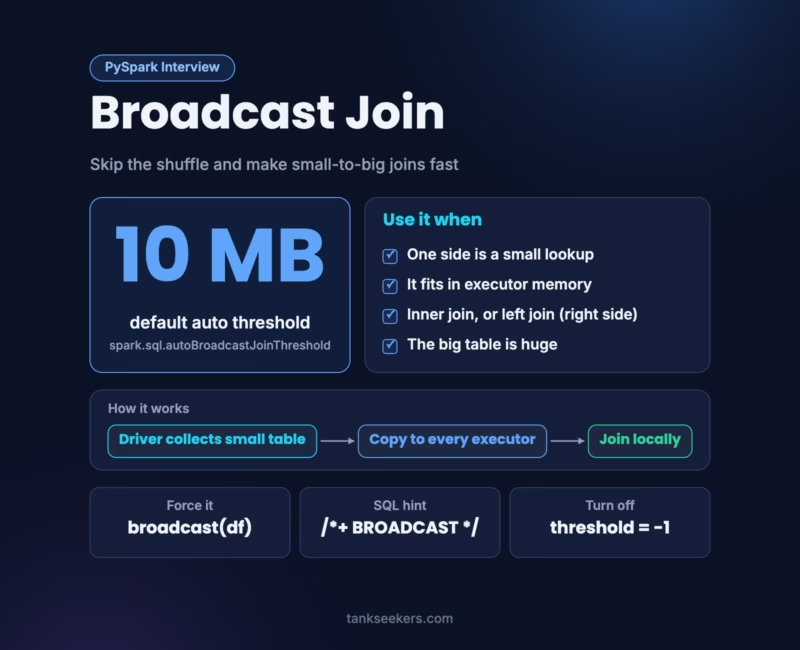
A broadcast join sends a full copy of a small table to every executor. Then, each executor joins its part of the big table locally. As a result, Spark skips the expensive shuffle of the big table. Spark does this on its own when a table is smaller than 10 MB, and you can force it with broadcast().
Why Normal Joins Can Be Slow
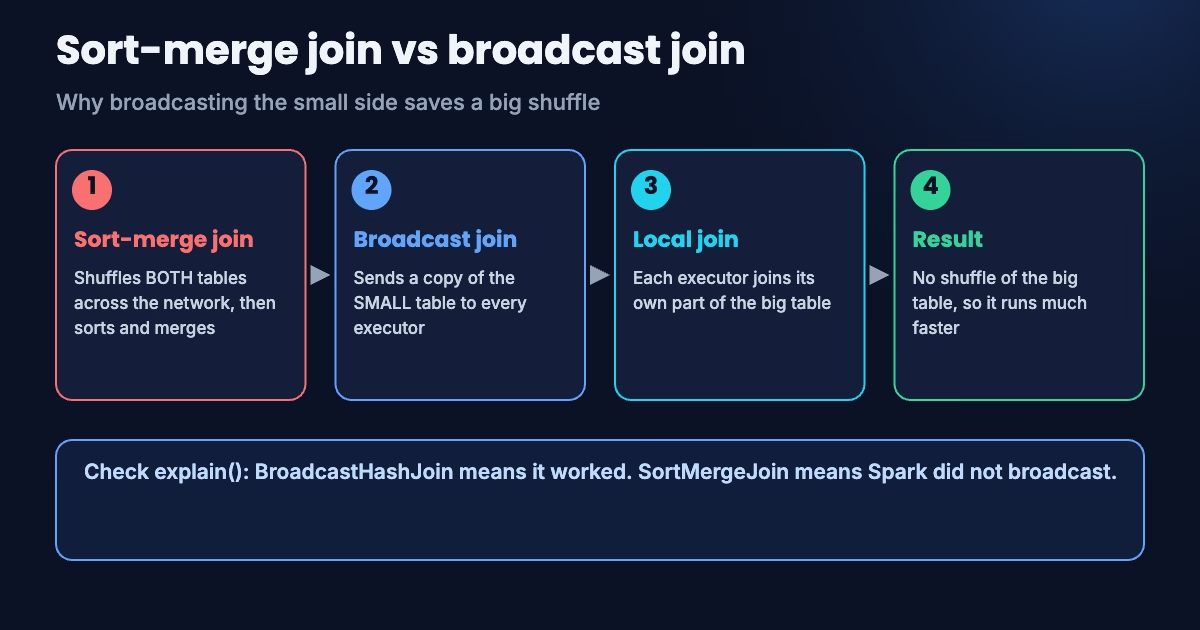
By default, Spark joins two big tables with a sort-merge join. First, it shuffles both tables across the network so matching keys land on the same executor. Then, it sorts and merges them.
That shuffle is the costly part. For example, if your orders table has 500 million rows, Spark moves a huge amount of data across the network just to match it with a tiny city lookup table.
How a Broadcast Join Works
Here’s a kitchen example. Imagine 10 cooks, each with a pile of orders. Instead of passing orders around the kitchen, you simply hand every cook a copy of the one-page menu. Now, each cook matches their own orders against the menu without moving anything.
In Spark terms, the driver collects the small table and sends a copy to every executor. Each executor then builds a hash table from it and joins its own partitions of the big table locally. Therefore, the big table never moves.
Broadcast Join in PySpark: Code Example
Let’s join a large orders table with a small cities table. To force one, wrap the small side in broadcast():
from pyspark.sql import SparkSession
from pyspark.sql.functions import broadcast

spark = SparkSession.builder.appName("broadcast-demo").getOrCreate()

orders = spark.createDataFrame(
    [(1, "DEL", 500), (2, "BOM", 700), (3, "DEL", 300), (4, "BLR", 900)],
    ["order_id", "city_code", "amount"],
)
cities = spark.createDataFrame(
    [("DEL", "Delhi"), ("BOM", "Mumbai"), ("BLR", "Bengaluru")],
    ["city_code", "city_name"],
)

result = orders.join(broadcast(cities), on="city_code", how="inner")
result.explain()   # look for BroadcastHashJoin in the plan
result.show()
When you run explain(), look for BroadcastHashJoin in the physical plan. If you see SortMergeJoin instead, then Spark didn’t broadcast.
Automatic Broadcasting and the 10 MB Threshold
Often, you don’t even need the hint. Spark broadcasts a table on its own when its estimated size is below spark.sql.autoBroadcastJoinThreshold. The default is 10 MB.
# Raise the limit to 50 MB
spark.conf.set("spark.sql.autoBroadcastJoinThreshold", 50 * 1024 * 1024)

# Turn automatic broadcasting off
spark.conf.set("spark.sql.autoBroadcastJoinThreshold", -1)
Also, with Adaptive Query Execution (AQE), on by default since Spark 3.2, Spark can switch a sort-merge join to a broadcast hash join at runtime. It does this when the real size of one side turns out to be small after earlier stages run.
Using Broadcast Hints in Spark SQL
If you write SQL, use a join hint. BROADCAST, BROADCASTJOIN and MAPJOIN all mean the same thing:
SELECT /*+ BROADCAST(c) */ o.order_id, c.city_name, o.amount
FROM orders o
JOIN cities c ON o.city_code = c.city_code;
When NOT to Use a Broadcast Join
- The “small” table isn’t small. Every executor must hold the full copy in memory, so a large table can cause out-of-memory errors.
- The driver is weak. Since the driver collects the table first, it needs enough memory too.
- Full outer joins. Spark can’t use a broadcast hash join for a full outer join.
- The wrong side. In a left outer join, only the right table can be broadcast. Similarly, in a right outer join, only the left table can.
- Slow builds. If broadcasting takes longer than
spark.sql.broadcastTimeout(300 seconds by default), the job fails.
💡 Interview trap: “Can I broadcast the left table in a left join?” The answer is no. Spark must keep every row of the left table, so it can only broadcast the right side.
By the way, broadcasting pairs nicely with partition tuning. If you haven’t yet, read my guide on repartition vs coalesce next.
How to Explain a Broadcast Join in an Interview
“A broadcast join sends a copy of the small table to every executor, so Spark can join locally and skip shuffling the big table. Spark does it automatically below the 10 MB autoBroadcastJoinThreshold, and I can force it with broadcast() or a BROADCAST hint. I check the plan for BroadcastHashJoin. However, I avoid it when the small side is too big for executor memory or when the join type doesn’t allow it, like a full outer join.”
🎮 Quick Quiz: Spark Joins
Now, check your understanding with six interview-style questions.
Key Takeaways
- It copies the small table to every executor and avoids shuffling the big one.
- Spark broadcasts automatically below 10 MB, and AQE can switch to it at runtime.
- Force it with
broadcast()in PySpark or aBROADCASThint in SQL. - Avoid it for large tables, full outer joins and the preserved side of outer joins.
Frequently Asked Questions (FAQ)
1. What is the default broadcast threshold in Spark?
It’s 10 MB, set by spark.sql.autoBroadcastJoinThreshold.
2. How do I disable automatic broadcasting?
Set spark.sql.autoBroadcastJoinThreshold to -1.
3. How do I confirm Spark broadcast the table?
Run explain() and look for BroadcastHashJoin in the physical plan. You can also check the Spark UI’s SQL tab.
4. Is this the same as a map-side join?
Yes, broadly. That’s why Spark SQL also accepts the MAPJOIN hint, a name that comes from Hive.

Pingback: Data Skew in Spark: 4 Proven Fixes - Tank Seekers