
If you have a Data Engineer interview coming up, get ready for this one: “What is the difference between repartition vs coalesce in PySpark?” Most people say “one shuffles, the other doesn’t” and then go quiet. That answer is right, but it is thin. Interviewers want to see that you know when to use each one, and what can go wrong. So, let’s walk through it in plain words, with tiny code snippets you can run yourself.
⚡ Repartition vs Coalesce: Quick Answer
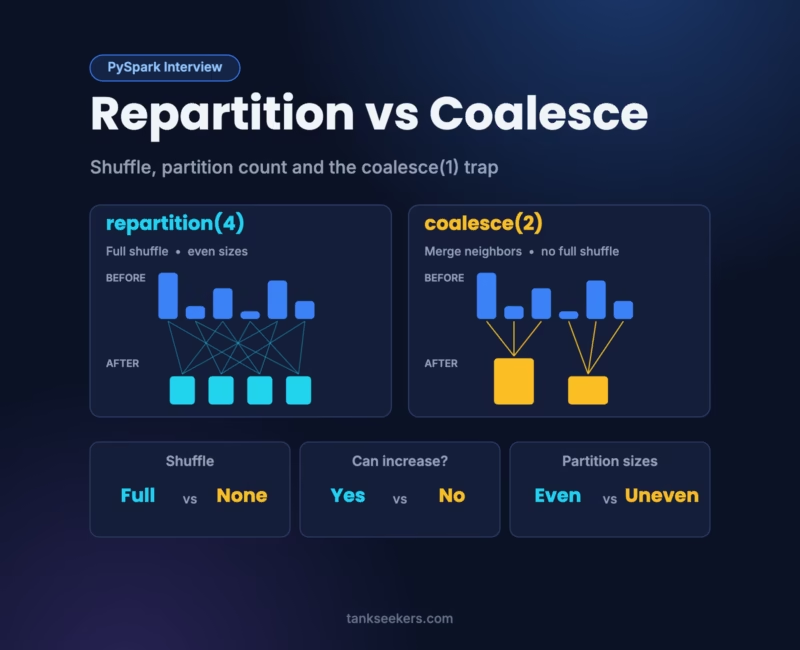
repartition() does a full shuffle. It can raise or lower the partition count, and it gives you evenly sized partitions. coalesce(), on the other hand, can only lower the count. It merges existing partitions without a full shuffle, so it is cheaper, but the sizes can end up uneven.
What Is a Partition in Spark?
Spark never handles your data as one giant block. Instead, it cuts the data into smaller pieces called partitions. One task on one CPU core handles one partition. So, if your DataFrame has 8 partitions and your cluster has 8 free cores, all 8 pieces run at the same time.
I like to picture a busy kitchen. The partitions are plates of chopped vegetables, and the cores are the cooks. With too few plates, some cooks just stand around. With too many tiny plates, however, the cooks waste time picking plates up instead of cooking.
Here is how you check the partition count:
from pyspark.sql import SparkSession, functions as F

spark = SparkSession.builder.appName("partitions-demo").getOrCreate()

df = spark.range(0, 1_000_000)   # one column called "id"
print(df.rdd.getNumPartitions())

# On Spark Connect or Databricks serverless, df.rdd is not available.
# Use this instead to see rows per partition:
df.groupBy(F.spark_partition_id().alias("pid")).count().show()
How repartition() Works
repartition() builds a brand-new set of partitions through a full shuffle. During a shuffle, Spark moves rows across the network between executors. That costs time. In return, though, you get partitions of roughly equal size.
- It can increase or decrease the number of partitions.
- With only a number, Spark spreads rows evenly in a round-robin way.
- With column names, rows that share a key land in the same partition (hash partitioning).
- With columns but no number, Spark falls back to
spark.sql.shuffle.partitions, which defaults to 200.
df10 = df.repartition(10)                 # 10 even partitions (full shuffle)

sales = spark.createDataFrame(
    [(1, "Delhi", 500), (2, "Mumbai", 700), (3, "Delhi", 300)],
    ["order_id", "city", "amount"],
)

by_city = sales.repartition(4, "city")       # same city -> same partition
by_city_default = sales.repartition("city")  # count = spark.sql.shuffle.partitions
How coalesce() Works
coalesce() has one job: it reduces the number of partitions. It does that by gluing together neighboring partitions, so Spark skips the full shuffle. In Spark terms, this is a narrow dependency. For example, if you go from 1,000 partitions down to 100, each new partition simply combines about 10 old ones.
Here’s a small trick that catches people out. If you ask coalesce() for more partitions than you already have, nothing happens. The count stays exactly the same.
df100 = spark.range(0, 1_000_000).repartition(100)

small = df100.coalesce(10)
print(small.rdd.getNumPartitions())   # 10

bigger = df100.coalesce(500)
print(bigger.rdd.getNumPartitions())  # still 100, coalesce cannot increase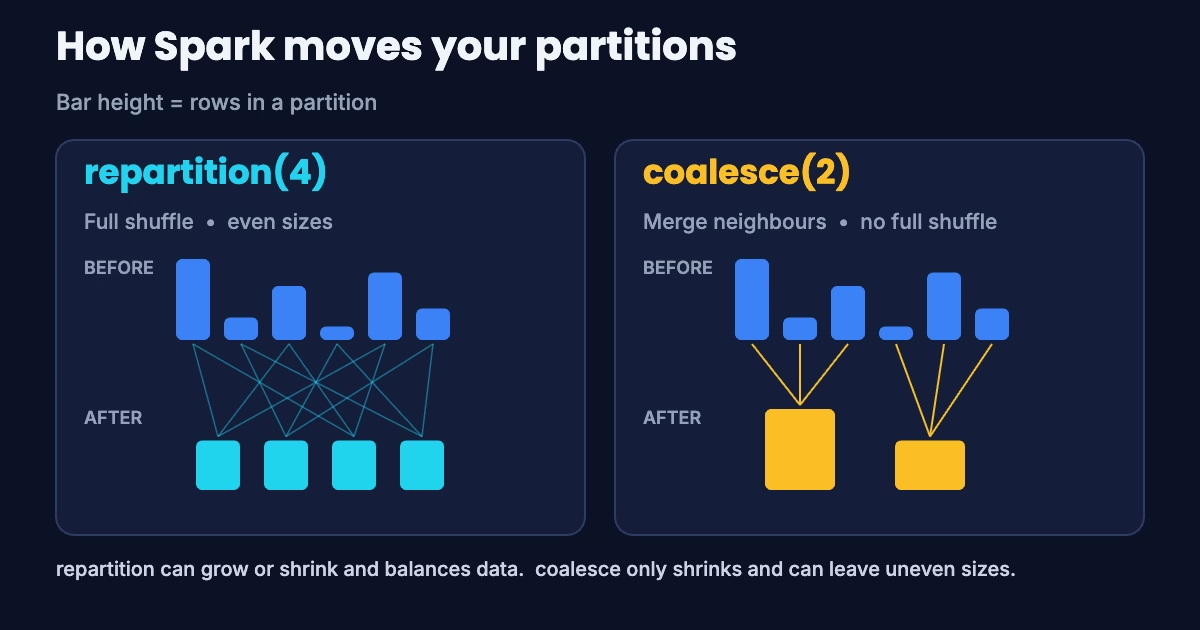
Try It: See Repartition vs Coalesce in Action
Click a button below. Each bar is one partition, and its height shows how many rows it holds.
Repartition vs Coalesce: Quick Comparison
Here is the whole repartition vs coalesce story on one screen:
| Point | repartition() | coalesce() |
|---|---|---|
| Shuffle | Yes, full shuffle | No full shuffle |
| Increase partitions? | Yes | No |
| Decrease partitions? | Yes | Yes |
| Partition sizes | Roughly equal | Can be uneven |
| Partition by column? | Yes | No |
| Speed | Slower (network I/O) | Usually faster |
The coalesce(1) Trap
Many beginners write df.coalesce(1).write.csv(...) to get one output file. For small data, it works fine. However, there is a hidden catch. Since coalesce adds no shuffle boundary, Spark can push that "1 partition" back into the earlier steps of your job. As a result, your heavy filters and joins may all run on a single task. That gets slow, fast.
The official Spark documentation warns about this "drastic coalesce" and suggests repartition() instead. Repartition adds a shuffle, so the earlier work still runs in parallel. Only the final write uses fewer partitions.
# Risky on big data: upstream work may run on 1 task
heavy_df.coalesce(1).write.mode("overwrite").parquet("/out/report")

# Safer: upstream stays parallel, shuffle happens at the end
heavy_df.repartition(1).write.mode("overwrite").parquet("/out/report")
💡 Interview trap: If someone asks "coalesce is always faster, right?", don't just nod. A drastic coalesce can make the whole stage slower, because it kills parallelism. That one line usually impresses the panel.
Real Use Case: Fixing the Small Files Problem
Say you filter a big table and most of your 200 partitions turn almost empty. Writing them out now creates 200 tiny files, and every future read slows down. Here, coalesce is perfect. You only want fewer partitions, and you don't need perfect balance:
failed_txn = transactions.filter(F.col("status") == "FAILED")
failed_txn.coalesce(8).write.mode("overwrite").parquet("/lake/failed_txn")
Now, what if you write data partitioned by a column, such as partitionBy("txn_date")? In that case, repartition by the same column first. You usually get one clean file per folder instead of a pile of small ones:
(transactions
    .repartition("txn_date")
    .write.mode("overwrite")
    .partitionBy("txn_date")
    .parquet("/lake/transactions"))
If you're building slowly changing dimensions on top of these tables, my guide on SCD Type 2 in SQL and PySpark pairs well with this one.
Repartition vs Coalesce in Spark SQL Hints and AQE
Do you mostly write SQL? Then you get the same control through partitioning hints:
SELECT /*+ COALESCE(3) */ * FROM sales;
SELECT /*+ REPARTITION(10) */ * FROM sales;
SELECT /*+ REPARTITION(10, city) */ * FROM sales;
SELECT /*+ REPARTITION_BY_RANGE(order_date) */ * FROM sales;
Also, there's a nice bonus in modern Spark. Since Apache Spark 3.2.0, Adaptive Query Execution (AQE) is on by default. After a shuffle, like a join or a groupBy, AQE can merge small shuffle partitions into bigger ones. By default, it aims for about 64 MB each through spark.sql.adaptive.advisoryPartitionSizeInBytes.
In other words, you often don't need to hand-tune those 200 shuffle partitions anymore. Bring up AQE in your interview. It shows you know current Spark, not just old tutorials. And if SQL rounds are on your list too, have a look at my SQL window functions interview guide.
How to Answer Repartition vs Coalesce in an Interview
Here's a 30-second answer you can say out loud:
"repartition() does a full shuffle. It can increase or decrease partitions, and it gives even sizes. It can also hash-partition by columns. coalesce() only reduces partitions by merging existing ones without a full shuffle. So it's cheaper, but sizes can be uneven. I use coalesce to cut output files after a filter. I use repartition when I need more parallelism, balanced data or grouping by a key. Also, I avoid coalesce(1) on big data, because it can push the whole stage onto one task."
Key Takeaways
- Need more partitions? Only
repartition()can do it. - Need fewer partitions cheaply? Use
coalesce(). - Need balanced data or grouping by a key? Use
repartition(n, "col"). - Writing one file from heavy data? Prefer
repartition(1)overcoalesce(1). - On Spark 3.2+? AQE already merges small shuffle partitions for you.
Frequently Asked Questions (FAQ)
1. Is coalesce() always faster than repartition()?
Usually, yes, because it skips the full shuffle. However, a drastic coalesce, such as down to 1, can make the whole job slower by killing parallelism.
2. Can coalesce() increase the number of partitions?
No. If you ask for more partitions than you have, the count stays the same.
3. What is the default value of spark.sql.shuffle.partitions?
It's 200. Spark uses it for joins, aggregations and repartition("col") when you don't pass a number.
4. Is repartition() a transformation or an action?
Both repartition and coalesce are lazy transformations. Nothing runs until you call an action like count() or a write.
5. What is repartitionByRange()?
It splits data by sorted ranges of a column instead of hash values. That helps when you want ordered, range-based output, for example by date.
6. Does repartition() fix data skew?
A plain repartition(n) spreads rows evenly. But repartition("col") on a skewed key can still dump most rows into one partition. For skewed joins, look at AQE skew join handling or salting instead.

Pingback: Data Skew in Spark: 4 Proven Fixes - Tank Seekers